Taxi and Cab Receipt Generator for Drivers
Driver, vehicle, route and fare breakdown for one trip. Download a PDF or PNG for the passenger.
- No signup required
- Works on any device
- Private & secure
- Pro from $5.92/mo removes the watermark
What's on it
What's Included in a Taxi Receipt
9 parts, each already laid out. Open one to see why it matters.
- Parts already laid out
- 9
- Totals add up as you type
- Auto
- Formats: PDF and PNG
- 2
1
Company or driver name and phone
The business name and phone number in the header. Add a logo from Business details if you have one.
2
Driver license and vehicle number
The Driver license no. and Vehicle no. lines in Trip details tie the trip to a licensed driver and vehicle. Use whichever permit number your area issues.
3
Date and time
The date and time print at the top of the receipt. Set them to the pickup time, since that is what a reviewer matches to a meeting or travel date.
4
Pickup and drop-off
Two typed lines in Trip details. Street or landmark level is enough; full addresses are optional.
5
Distance and duration
Typed lines too. The editor doesn't measure the route, so copy the figures from your meter or trip log. They help a reviewer judge whether the fare is reasonable.
6
Fare breakdown
The Fare list holds one line each for base fare, distance, waiting time, tolls and airport fee. The subtotal adds the lines up, and you can add, rename or remove lines.
7
Tax
Tax is worked out on the fare subtotal at the rate set in Receipt Style, and the row prints that rate beside its title, such as 'Sales tax (5%)'. The title is typed text, so rename it 'GST' or 'VAT' if that is the tax you charge.
8
Tip
A separate line below the tax, typed in, so it stays put when you edit a fare line. Leave it out of the fare lines so a reviewer can see it on its own.
9
Total and payment
The total is the subtotal plus tax plus tip. The 'Paid by card' line under it is a typed amount and label, so change it to cash or whatever was used and make the figure match the total.
Who Uses This Template
- Independent taxi and private-hire drivers
- Airport transfer and chauffeur services
- Corporate shuttle operators
- Drivers in markets where a 'cab bill' is routinely requested for reimbursement
Making Your Taxi Receipt, Step by Step
- 1
Add your business details
- 2
Enter the trip details
- 3
Add the fare lines
- 4
Set the tax, tip and payment
- 5
Download and send
Pricing
Free to make. Pro when you need it.
Every template, edit and download is free, with a watermark. Go Pro to remove it and add your own branding.
Pro Annual
Save 40%$5.92/ month
$70.99 billed annually.
Plan includes
- Unlimited watermark-free PDFs & PNGs
- Your logo & brand colors
- Custom fonts & spacing
- Every receipt template
Free · $0
PDF and PNG downloads with a watermark.
Taxi Receipt Guide
The detail behind the template. Open what you need.
About the taxi receipt
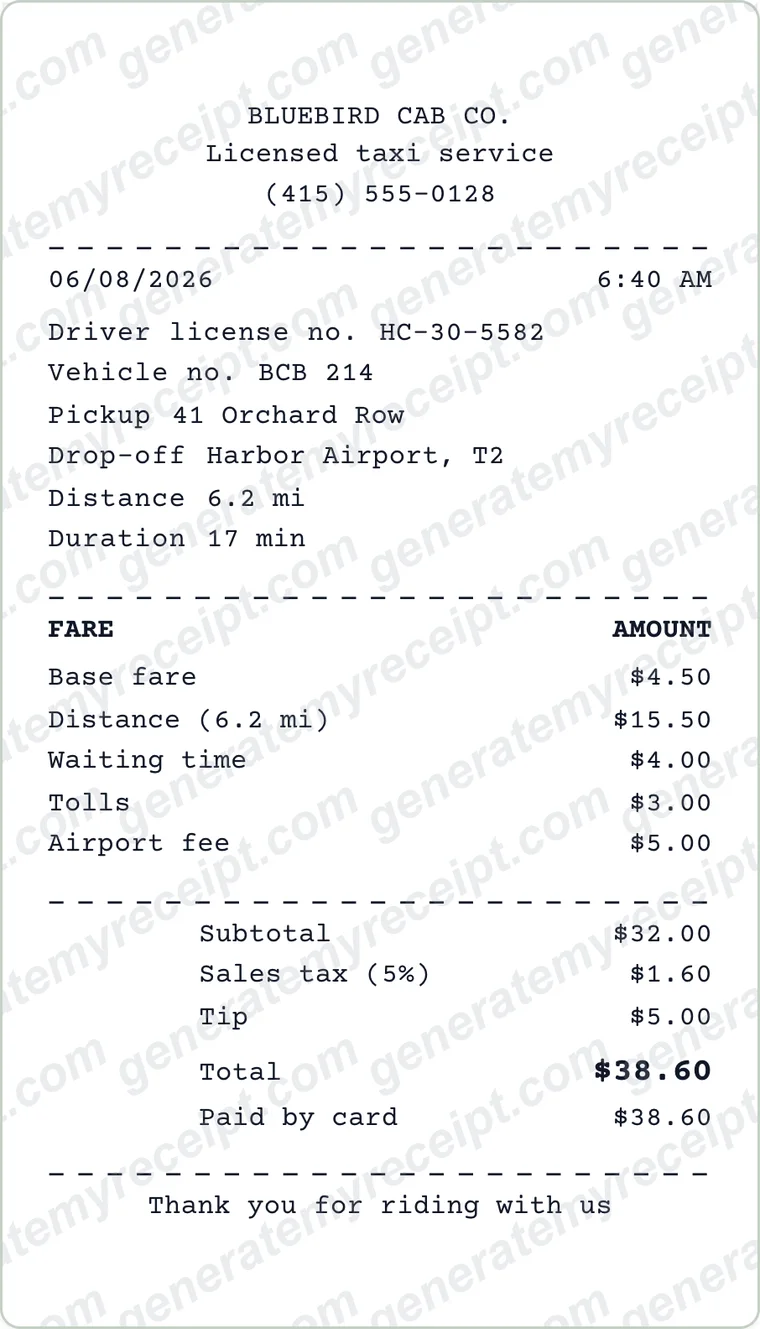
A taxi receipt records one trip: the driver and vehicle, where it started and ended, and what the fare was made of. Fill in the trip and fare lines here, then download a PDF or PNG to send to the passenger.
Passengers ask for taxi receipts because they need to claim the fare back from an employer or a client. Independent drivers, chauffeur services and small cab firms often don't have a meter that prints, or the printer has run out of paper at the worst moment.
This template is laid out for a single trip: driver license and vehicle number, pickup, drop-off, distance and duration, then a fare list with base fare, distance, waiting time, tolls and airport fee. Tax is calculated on the fare subtotal and the tip is its own line, so the total follows from them. Working out a tip percentage? The tip calculator does it.
What the Rules Say
The IRS says documentary evidence, such as a receipt, will ordinarily be considered adequate if it shows the amount, date, place and essential character of the expense. On a taxi receipt, the date, the pickup and drop-off and the fare breakdown do that work.
Source: IRS Publication 463, chapter 5The IRS generally expects documentary evidence for business expenses. Its listed exceptions include an expense, other than lodging, of less than $75, and a transportation expense for which a receipt isn't readily available.
Source: IRS Publication 463, chapter 5When travelling away from home on business, the IRS lists taxi, commuter bus and airport limousine fares between the airport or station and your hotel, and between the hotel and a work location, among deductible travel costs. A taxi between home and your regular workplace is a personal commuting expense that can't be deducted.
Source: IRS Publication 463, chapters 1 and 4
Filled-In Example
- Base fare
- 4.50
- Distance (6.2 mi)
- 15.50
- Waiting time
- 4.00
- Tolls
- 3.00
- Airport fee
- 5.00
- Subtotal
- 32.00
- Sales tax 5%
- 1.60
- Tip
- 5.00
- Total paid by card
- 38.60
Sample with invented names: Bluebird Cab Co., 8 June 2026, pickup 06:40 at 41 Orchard Row, drop-off at Harbor Airport T2, 6.2 mi in 17 min. Tolls and the airport fee have their own lines, so they can be coded separately on an expense report, and the tip is not folded into the fare.
Common Mistakes to Avoid
- Leaving out the date or the route. Without them a reviewer has nothing to match the receipt to a trip.
- Rolling tolls and airport fees into the fare. Some employers code them separately, and one lump sum makes that impossible.
- Showing a rounded fare with the tip hidden inside it, instead of on its own line.
- A total that doesn't match the card payment. The tip and the card line are typed, so after you change a fare line, check both again.
Good to know: Make the date and route the first thing you check before sending. Everything else on a taxi receipt can be queried later, but a receipt that doesn't say when and where gets sent back.
Which Document Do You Need?
| If you have | Use |
|---|---|
| A corporate account with many trips | Send a monthly statement or invoice listing every trip. A taxi receipt covers one trip only. |
| A passenger who booked through a ride-hailing app | The official receipt lives in the app's trip history. Use this template only for trips you provided yourself. |
| A driver or passenger who needs a duplicate of a receipt that was lost | Ask the driver or company for a copy first. Don't present a self-made receipt as the original. |
Step-by-Step Details
- Add your business details. Enter the name or company and phone in Business details. Upload a logo if you have one.
- Enter the trip details. Set the date and pickup time, then type the driver license number, vehicle number, pickup, drop-off, distance and duration.
- Add the fare lines. Give each charge a name and an amount: base fare, distance, waiting time, tolls and fees. The subtotal, tax and total update as you type.
- Set the tax, tip and payment. Set the tax rate under Receipt Style (the tax row prints it), rename the row if you charge GST or VAT, then type the tip and the amount paid. The tip calculator can work out a percentage.
- Download and send. Download the receipt as a PDF or PNG and send it to the passenger. Free downloads carry a watermark; Pro removes it.
Taxi Receipt FAQs
What should a taxi receipt include?
The driver or company name, license or vehicle number, date and time, pickup and drop-off, the fare breakdown, any tip, the total and the payment method.
Can a driver send a receipt by text or email?
Yes. Download the PNG or PDF and send it to the passenger's phone or inbox. Free downloads carry a watermark; Pro removes it.
How do I get a receipt for an Uber or Lyft ride?
Open the app, go to your trip history, select the trip and request the receipt. That is the official receipt; this template is for drivers issuing their own.
What is a cab bill?
A phrase common in Indian English for a taxi receipt submitted to an employer for travel reimbursement. It carries the same details as any taxi receipt, and this editor can show amounts in ₹ with a tax row titled 'GST'.
Should tolls be on a separate line?
Yes. Some employers reimburse tolls and airport fees under a different code, so a line each in the Fare list makes the receipt easier to process.
Can I use ₹, £ or € and show GST or VAT?
Yes. Pick $, £, € or ₹ under Receipt Style, then Format. Tax is one rate on the subtotal, set in Receipt Style, and the row prints the rate beside its typed title, so rename it 'GST' or 'VAT' and it reads, for example, 'GST (5%)'. If only some lines are taxable, type the tax amount into the tax row. Your figure stays, but the total doesn't recalculate from it, so type the total too.
Is GenerateMyReceipt free to use?
Free to make and download (watermarked); Pro removes the watermark. No signup is needed to download. Pro costs $9.99 a month, or $70.99 a year (about $5.92 a month).
What file formats can I download my receipt in?
Download as a PDF or PNG, then print or share the file.
Related Templates
Browse all receipt templates
Ready to create your taxi receipt?
Free downloads include a watermark. No account required.
Use Honestly: use these receipts for payments you actually received. Don't use them to claim expenses, returns or tax deductions for purchases that didn't happen.