Restaurant Receipt Generator with Tip and Tax Lines
Table, covers, every dish, tax, service charge and tip on one receipt. Download a PDF or PNG.
- No signup required
- Works on any device
- Private & secure
- Pro from $5.92/mo removes the watermark
What's on it
What's Included in a Restaurant Receipt
8 parts, each already laid out. Open one to see why it matters.
- Parts already laid out
- 8
- Totals add up as you type
- Auto
- Formats: PDF and PNG
- 2
1
Restaurant name, address and phone
Identifies who issued the receipt. If your country requires a tax or registration number on sales documents, add it as another line in the header.
2
Check number
A unique, sequential number lets you find the sale later and match it to your POS or bank deposit. It sits in Check details with the table, covers and server.
3
Date and time
Both print at the top of the receipt, so a late-night or weekend meal is easy to place.
4
Table, covers and server
Covers is the number of guests. It helps your own reconciliation and guests splitting a bill, and for business meals the IRS lists the number of people served among the details a restaurant receipt should show.
5
Food and drinks
Each dish with quantity and unit price; the line total is quantity × unit price. Put alcohol on its own line so a reviewer can separate it.
6
Subtotal and tax
The subtotal adds up the item lines. Tax is worked out on the subtotal at the rate set in Receipt Style and printed with that rate.
7
Service charge and tip
Two separate lines, both typed in, so they don't change when you edit an item. The sample prints what each was based on, such as '10% of subtotal'.
8
Payment
The total and how it was paid, for example 'Visa •••• 4821': card type and last four digits only, never the full number.
Who Uses This Template
- Food trucks, pop-ups and market stalls that take payment without a receipt printer
- Restaurants whose POS is offline and need to give guests a proper record
- Caterers confirming payment for a private event
- Cafés and bars that want a clean itemized copy for a guest's expense claim
Making Your Restaurant Receipt, Step by Step
- 1
Add your restaurant details
- 2
Enter the check details
- 3
Add each dish and drink
- 4
Set the tax rate, service charge and tip
- 5
Mark the payment and download
Pricing
Free to make. Pro when you need it.
Every template, edit and download is free, with a watermark. Go Pro to remove it and add your own branding.
Pro Annual
Save 40%$5.92/ month
$70.99 billed annually.
Plan includes
- Unlimited watermark-free PDFs & PNGs
- Your logo & brand colors
- Custom fonts & spacing
- Every receipt template
Free · $0
PDF and PNG downloads with a watermark.
Restaurant Receipt Guide
The detail behind the template. Open what you need.
Ready to fill one in?
Free downloads include a watermark. No account required.
About the restaurant receipt
A dine-in receipt shows the table, server and guest count, each dish on its own line, then subtotal, tax, service charge, tip and the amount paid. Fill in your details here and download a PDF or PNG.
A restaurant receipt does two jobs at once. For the guest it is proof of what they ate, what they paid and what they tipped; for the restaurant it ties the order to the payment in the day's sales record. When the point-of-sale system is down, when you run a pop-up or food stall without a till, or when a guest asks for a cleaner itemized copy for an expense claim, you need one that is quick to produce and easy to read.
This template is laid out for table service: check number, table, covers and server at the top, then every dish and drink with quantity and unit price. Subtotal, tax and total calculate as you type, while the service charge, tip and card amount are lines you type in, so the sample prints how each one was worked out. Need a percentage? The tip calculator does it.
What the Rules Say
For a business meal, the IRS says a restaurant receipt is enough to prove the expense if it shows the restaurant's name and location, the number of people served, and the date and amount. If a charge is made for items other than food and beverages, the receipt must show that.
Source: IRS Publication 463, chapter 5The IRS generally expects documentary evidence, such as receipts, to support business expenses. One listed exception is an expense, other than lodging, of less than $75.
Source: IRS Publication 463, chapter 5For tax purposes the IRS treats a payment as a tip only when the customer voluntarily decides to pay it and sets the amount. A mandatory charge added to the bill is a service charge, not a tip, and calling it a tip doesn't change that.
Source: IRS tip recordkeeping and reporting
Filled-In Example
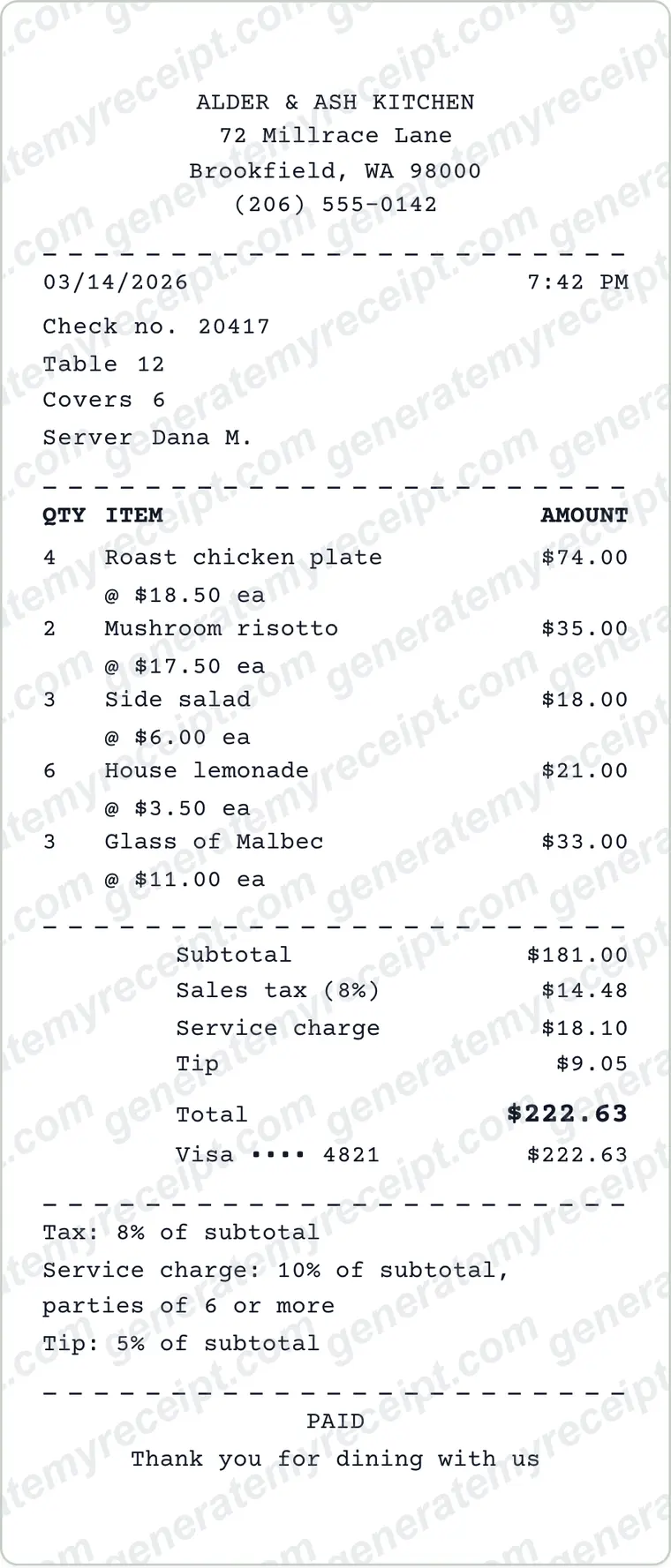
- 4 × Roast chicken plate @ 18.50
- 74.00
- 2 × Mushroom risotto @ 17.50
- 35.00
- 3 × Side salad @ 6.00
- 18.00
- 6 × House lemonade @ 3.50
- 21.00
- 3 × Glass of Malbec @ 11.00
- 33.00
- Subtotal
- 181.00
- Sales tax 8% of subtotal
- 14.48
- Service charge 10% of subtotal (parties of 6+)
- 18.10
- Tip 5% of subtotal
- 9.05
- Total paid, Visa •••• 4821
- 222.63
Sample with invented names: Alder & Ash Kitchen, table 12, 6 guests, the editor's starting receipt. The wine has its own line, so an employer that doesn't reimburse alcohol can take out 33.00 without rejecting the whole receipt, and the receipt states what each percentage was based on.
Common Mistakes to Avoid
- Printing only a total. A one-line 'Food & drinks' receipt gives a reviewer nothing to check, and alcohol can't be separated out.
- Calculating the tip on the post-tax amount without saying so. State the base whenever you print a percentage.
- Putting a mandatory service charge and a voluntary tip on one line. The IRS treats them differently, so keep them apart.
- Leaving out the date and time. A missing time looks careless.
- A receipt total that doesn't match the card slip. If the slip shows $222.63, the total paid on the receipt must say $222.63.
Good to know: Print the base next to every percentage, for example 'Tip: 5% of subtotal'. A reviewer or guest can then redo the sum in seconds, and nobody has to guess whether tax was included.
Which Document Do You Need?
| If you have | Use |
|---|---|
| A guest only has a card slip | A card slip proves a payment was made but not what was ordered. This itemized receipt does both. |
| A private event booked in advance | Send an invoice first, then this receipt once the bill is settled. |
| A deposit on a group booking | Give a separate receipt for the deposit and show it as a payment on the final bill. |
| You also sell goods, such as bottles or merchandise | Use the itemized receipt generator, which has a tax code beside each line. |
Step-by-Step Details
- Add your restaurant details. Enter the venue name, address and phone in Business details. Upload a logo if you have one.
- Enter the check details. Set the date and time, then the check number, table, covers and server.
- Add each dish and drink. Give every line a name, a quantity and a unit price. The line total, subtotal, tax and total update as you type.
- Set the tax rate, service charge and tip. Set the tax rate under Receipt Style and type the service charge and tip amounts. The note under the totals is plain text, so edit it to match your rate and percentages. Then check the total against the payment. The tip calculator can work out a percentage.
- Mark the payment and download. Set the card line to match the total, then download the receipt as a PDF or PNG. Free downloads carry a watermark; Pro removes it.
Restaurant Receipt FAQs
What should a restaurant receipt include?
The restaurant's name and address, a receipt number, date and time, each item with its price, subtotal, tax, any service charge, tip, the total and the payment method. For a business-meal claim the IRS also looks for the number of people served.
Should the tip be on the receipt?
Yes, if it was paid by card or included in the payment. Show it on its own line under the subtotal and tax so the final total matches what was charged. Here the tip is a typed amount, so enter it before you check the total.
Is a service charge the same as a tip?
No. A mandatory charge the restaurant adds to the bill is a service charge, while a tip is a payment the customer chooses to make and sets the amount of. The IRS treats the two differently, so keep them on separate lines. Whether a service charge is subject to sales tax depends on where you are; this editor calculates tax on the subtotal, so if your area taxes the charge, enter it as an item line instead.
Can I make a receipt for a meal I paid for but lost the receipt?
Ask the restaurant for a duplicate first; many POS systems can reprint by date and card. If that fails, many employers accept their own missing-receipt form with your card statement. Do not present a self-made receipt as the restaurant's original.
Can I add my restaurant's logo?
Yes. Upload a PNG or SVG logo in Business details and it appears at the top of the receipt.
Can I download it as a PDF?
Yes. Download a PDF to email or print, or a PNG to share by message. Free downloads carry a watermark; Pro removes it.
Is GenerateMyReceipt free to use?
Free to make and download (watermarked); Pro removes the watermark. No signup is needed to download. Pro costs $9.99 a month, or $70.99 a year (about $5.92 a month).
What file formats can I download my receipt in?
Download as a PDF or PNG, then print or share the file.
Related Templates
Browse all receipt templates
Ready to create your restaurant receipt?
Free downloads include a watermark. No account required.
Use Honestly: use these receipts for payments you actually received. Don't use them to claim expenses, returns or tax deductions for purchases that didn't happen.