Apple Receipt Mockup Template – Editable Boxed Layout
An Apple-style boxed receipt mockup for design work and presentations.
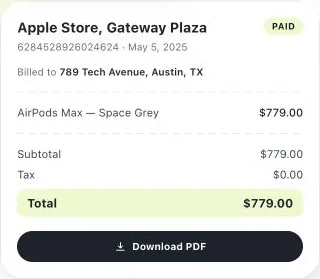
- No signup required
- Works on any device
- Private & secure
- Pro from $5.92/mo removes the watermark
What's on it
What's Included in an Apple Store Receipt (Boxed Layout)
4 parts, each already laid out. Open one to see why it matters.
- Parts already laid out
- 4
- Totals add up as you type
- Auto
- Formats: PDF and PNG
- 2
1
Logo header block
A boxed header with logo, store name, and full address — this layout reads more like a printed letterhead than a thermal slip.
2
Reference number
A long transaction reference number, distinct from an order number, printed near the card details.
3
Card status line
An explicit approval status alongside the card type and entry method — chip, debit, or credit.
4
Section-based layout
Every block on the receipt — header, date, items, totals, barcode — is its own editable section, so you can reorder or resize without touching the others.
Making Your Apple Store Receipt (Boxed Layout), Step by Step
- 1
Start with the Apple Store Receipt (Boxed Layout) layout
- 2
Fill in your details
- 3
Export and send
Pricing
Free to make. Pro when you need it.
Every template, edit and download is free, with a watermark. Go Pro to remove it and add your own branding.
Pro Annual
Save 40%$5.92/ month
$70.99 billed annually.
Plan includes
- Unlimited watermark-free PDFs & PNGs
- Your logo & brand colors
- Custom fonts & spacing
- Every receipt template
Free · $0
PDF and PNG downloads with a watermark.
Apple Store Receipt (Boxed Layout) Guide
The detail behind the template. Open what you need.
About the apple store receipt (boxed layout)
Use this editable Apple-style boxed receipt mockup template for design work and presentations. Add a logo header, store, item, payment, and barcode fields in the section-based live builder.
Good to Know
This layout and the thermal-style Apple Store receipt document the same kind of purchase differently — pick whichever matches the original format you're recreating, since mixing the two looks inconsistent.
Common Uses for an Apple Store Receipt (Boxed Layout)
Printable store copy
A boxed layout that prints cleanly on standard paper, closer to a mailed or emailed receipt than a register roll.
Presentation or mockup use
A polished, letterhead-style receipt for a presentation, prototype, or design mockup.
Warranty or return filing
A dated copy showing the product, price, and reference number for a support or return request.
Step-by-Step Details
- Start with the Apple Store Receipt (Boxed Layout) layout. Already matched to what this kind of transaction needs — no blank page to stare at.
- Fill in your details. Add the amounts, dates, and names for this apple store receipt (boxed layout). Totals calculate automatically as you type.
- Export and send. Download your finished receipt as a PDF or PNG.
Apple Store Receipt (Boxed Layout) FAQs
How is this different from the other Apple Store receipt template?
This is a boxed, section-based layout with a logo header — closer to a printed letterhead. The other Apple Store template is a continuous thermal-roll style, closer to what prints at the register.
Can I reorder the sections on this receipt?
Yes — the editor is section-based, so the header, item table, totals, and barcode can each be moved, resized, or removed independently.
Is this an official retailer receipt?
No. This is an editable brand-style template for mockups, design work, and personal record layouts. It is not issued by the retailer and is not proof of purchase.
Is GenerateMyReceipt free to use?
Yes. Templates, editing, and downloads are free, with no signup required; free downloads carry a watermark. Pro costs $9.99 a month, or $70.99 a year (about $5.92 a month). Sign in to save templates to your account.
What file formats can I download my receipt in?
Download as a PDF or PNG, then print or share the file.
Related Templates
Browse all receipt templates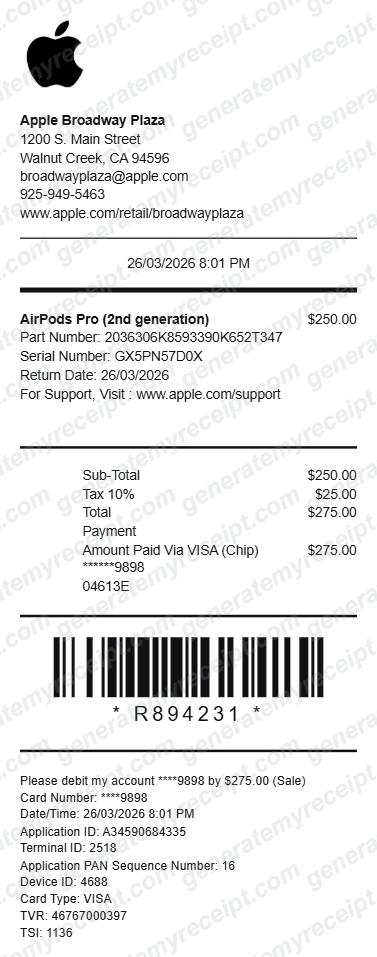
Ready to create your apple store receipt (boxed layout)?
Free downloads include a watermark. No account required.
Template use notice: This is an editable, brand-style layout for mockups, design work, and personal records. It is not an official retailer receipt or proof of purchase, and should not be used for returns, warranty claims, reimbursements, or verification.