Marketplace
Amazon Receipt Template – Editable US Invoice Layout
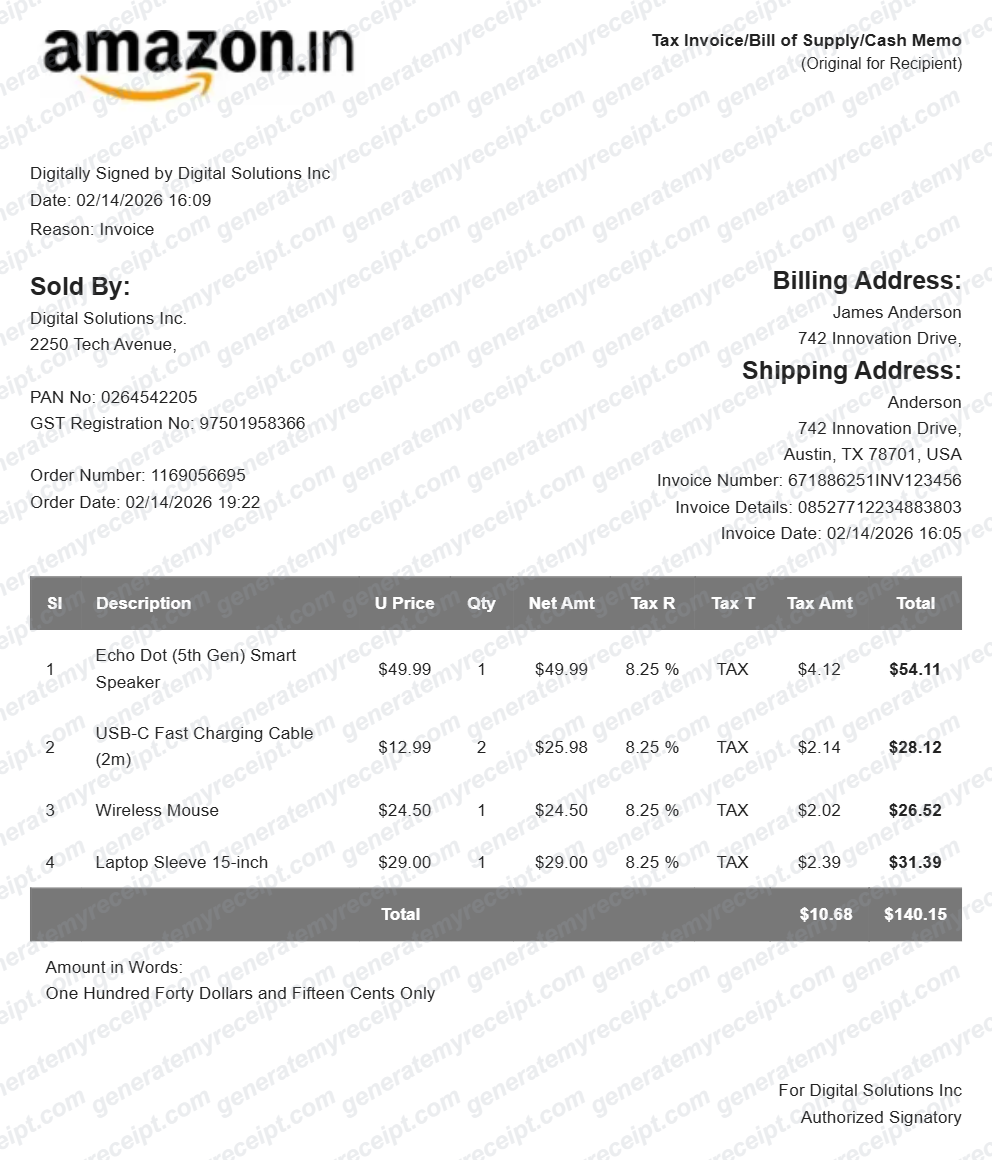
Use this editable Amazon-style US invoice template for mockups, design work, or personal record layouts. Add seller, billing, shipping, item, sales-tax, and total fields in the live builder.
- No signup required
- Works on any device
- Private & secure
What's Included in an Amazon Receipt
Worth knowing before you fill one in.
Order & invoice number
The order number and a separate invoice number — Amazon issues both, and expense systems usually ask for one or the other.
Billing & shipping address
Both addresses shown side by side, since they're often different — a common source of confusion on a hand-made copy.
Itemized products with tax rate
Each product on its own line with unit price, quantity, and the tax rate applied to it, not just a bundled total.
Seller ("Sold By") details
Marketplace orders are often fulfilled by a third-party seller, not Amazon itself — the invoice names who actually sold the item.
Annotated example: how to read this layout
These sample callouts explain the document structure. Replace them only with details from your own lawful record or mockup.
- 1
Order and invoice IDs
INV123456
An invoice reference should be distinct, readable, and traceable to the order record.
- 2
Sold By
Digital Solutions Inc.
Marketplace paperwork names the legal seller rather than assuming Amazon sold the item.
- 3
Itemized tax
$129.47 + $10.68
List products and tax separately so the arithmetic reaches the displayed total.
Making Your Amazon Receipt, Step by Step
Pick, fill in, export. That's the whole flow.
- 1
Start with the Amazon Receipt layout
Already matched to what this kind of transaction needs — no blank page to stare at.
- 2
Fill in your details
Add the amounts, dates, and names for this amazon receipt. Totals calculate automatically as you type.
- 3
Export and send
Download as a PDF, print it, or email it straight to the other party.
Good to Know
If the order still exists in your account, download the real invoice from Order History first — it's the authoritative copy. Use this builder to reconstruct one when the original genuinely can't be retrieved.
Common Uses for an Amazon Receipt
A few of the ways people put this template to work.
Expense reports
A proper itemized invoice, not a screenshot of an order summary, is what most expense systems expect for a marketplace purchase.
Business bookkeeping
Recreate a lost invoice for a business purchase so it can be filed and reconciled correctly.
Warranty or return support
A dated copy of the order details when the original invoice isn't easy to find in your account.
Amazon Receipt FAQs
What's the difference between an Amazon order confirmation and an invoice?
An order confirmation summarizes what you bought. A tax invoice itemizes price, tax rate, and tax amount per line, and is what accounting and reimbursement systems typically require.
Can I add multiple products with different tax rates?
Yes — each line item has its own price, quantity, and tax rate field, so a mixed-tax order still totals correctly.
Is this an official retailer receipt?
No. This is an editable brand-style template for mockups, design work, and personal record layouts. It is not issued by the retailer and is not proof of purchase.
Is GenerateMyReceipt free to use?
Yes. You can create and download basic receipts for free, with no signup required. Paid plans add saved branding, templates, and receipt history.
What file formats can I download my receipt in?
Download as a PDF, print it directly, or email it to your customer instantly.
Related Templates
Amazon VAT Invoice Template (UK/EU)
Create an editable Amazon-style UK/EU VAT invoice layout for mockups, design work, and personal record layouts. Add VAT, delivery, billing, order, and payment-reference fields in the live builder.
Apple Store Receipt
Use this editable Apple Store-style thermal receipt template for mockups, design work, or personal record layouts. Add store, product, serial, tax, payment, and barcode fields in the live builder.
Adidas Receipt
Use this editable Adidas-style thermal receipt template for mockups, design work, or personal record layouts. Add store details, item lines, tax, payment, and a barcode in the live builder.