Retail
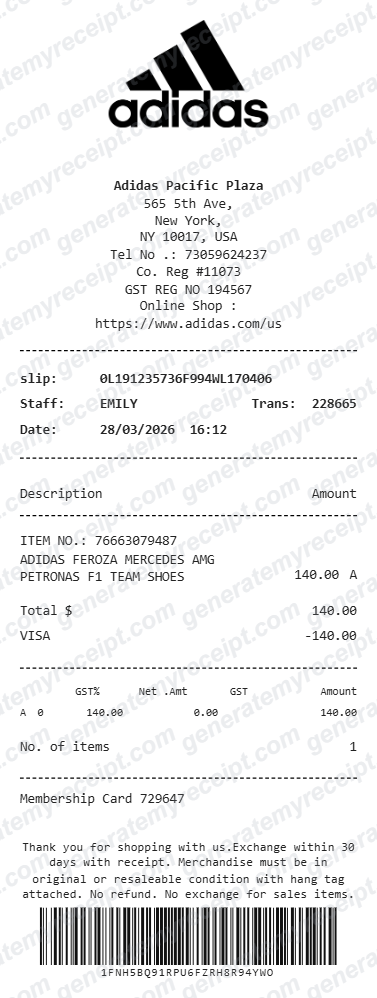
Adidas Receipt Template – Editable Thermal Layout
Use this editable Adidas-style thermal receipt template for mockups, design work, or personal record layouts. Add store details, item lines, tax, payment, and a barcode in the live builder.
- No signup required
- Works on any device
- Private & secure
What's Included in an Adidas Receipt
Worth knowing before you fill one in.
Store & slip number
The issuing store's address block plus a slip or transaction number — the reference an Adidas register uses to look up a sale.
Item number and description
A product/style code alongside the item name, matching how Adidas rings up footwear and apparel at the counter.
GST or sales tax breakdown
Tax shown by rate and amount, not folded into the total — the format most retail tax authorities expect on a valid receipt.
Barcode
A scannable barcode tied to the transaction, the same way a physical slip carries one for returns and lookups.
Making Your Adidas Receipt, Step by Step
Pick, fill in, export. That's the whole flow.
- 1
Start with the Adidas Receipt layout
Already matched to what this kind of transaction needs — no blank page to stare at.
- 2
Fill in your details
Add the amounts, dates, and names for this adidas receipt. Totals calculate automatically as you type.
- 3
Export and send
Download as a PDF, print it, or email it straight to the other party.
Good to Know
Real Adidas receipts vary by channel — an in-store slip, an online order confirmation, and a CONFIRMED app drop each carry different fields. Match the style to how the purchase actually happened rather than mixing formats.
Common Uses for an Adidas Receipt
A few of the ways people put this template to work.
Purchase records
Document a footwear or apparel purchase for your own records or an expense report.
Resale documentation
Pair a receipt with a listing when reselling sneakers or apparel, alongside the item's own authentication.
Gift or reimbursement proof
A clean copy to hand over when a purchase needs to be reimbursed or verified after the fact.
Adidas Receipt FAQs
What details does an Adidas receipt normally include?
Store address and slip number, a style or item code, GST/tax broken out by rate, the payment method, and often a barcode for returns lookups.
Can I edit the logo, store address, and items after generating it?
Yes — the builder is a live editor. Click any field on the receipt or use the section panel to change the logo, store details, items, totals, and barcode before exporting.
Is this an official retailer receipt?
No. This is an editable brand-style template for mockups, design work, and personal record layouts. It is not issued by the retailer and is not proof of purchase.
Is GenerateMyReceipt free to use?
Yes. You can create and download basic receipts for free, with no signup required. Paid plans add saved branding, templates, and receipt history.
What file formats can I download my receipt in?
Download as a PDF, print it directly, or email it to your customer instantly.
Related Templates
Cartier Receipt
Use this editable Cartier-style boutique receipt template for mockups, design work, or personal record layouts. Add purchaser details, reference fields, item lines, tax, and payment in the live builder.
Amazon Receipt
Use this editable Amazon-style US invoice template for mockups, design work, or personal record layouts. Add seller, billing, shipping, item, sales-tax, and total fields in the live builder.
Apple Store Receipt
Use this editable Apple Store-style thermal receipt template for mockups, design work, or personal record layouts. Add store, product, serial, tax, payment, and barcode fields in the live builder.