Itemized Receipt Generator for Reimbursement-Ready Records
Every item on its own line, with totals and sales tax worked out as you type. Download a PDF or PNG.
- No signup required
- Works on any device
- Private & secure
- Pro from $5.92/mo removes the watermark
What's on it
What's Included in an Itemized Receipt
7 parts, each already laid out. Open one to see why it matters.
- Parts already laid out
- 7
- Totals add up as you type
- Auto
- Formats: PDF and PNG
- 2
1
Seller name and address
Your business name, address and phone in the header, plus your tax registration number on the Tax reg. no. line in Store details when your customer or tax authority needs one.
2
Receipt number and date
A unique receipt number and the transaction date, so the receipt can be matched to a payment and isn't claimed twice.
3
Item description
Specific enough to identify the product or service: 'USB-C cable 2 m', not 'Accessories'.
4
Quantity and unit price
Enter both and the line total is worked out as quantity × unit price. Lines with more than one unit print the unit price underneath ("@ $9.49 ea").
5
Discounts
Mark a line as a discount and it prints as a negative amount that comes off the subtotal. A Total discount row adds up all the discount lines.
6
Tax and tax codes
Set the tax rate once and the tax line is calculated on the subtotal and labeled with its rate. A code beside each amount, such as T, shows which lines were taxed.
7
Total and payment method
The total paid and how it was paid, for example 'Visa ending 7302' or 'Cash'.
Who Uses This Template
- Shops issuing receipts that customers can claim as expenses
- Service providers listing parts and labor separately
- Medical and dental providers supporting FSA or HSA claims
- Event suppliers billing several items at once
Making Your Itemized Receipt, Step by Step
- 1
Add your business details
- 2
Set the receipt number and date
- 3
Add each item
- 4
Apply discounts and tax
- 5
Download your receipt
Pricing
Free to make. Pro when you need it.
Every template, edit and download is free, with a watermark. Go Pro to remove it and add your own branding.
Pro Annual
Save 40%$5.92/ month
$70.99 billed annually.
Plan includes
- Unlimited watermark-free PDFs & PNGs
- Your logo & brand colors
- Custom fonts & spacing
- Every receipt template
Free · $0
PDF and PNG downloads with a watermark.
Itemized Receipt Guide
The detail behind the template. Open what you need.
Ready to fill one in?
Free downloads include a watermark. No account required.
About the itemized receipt
An itemized receipt lists every product or service on its own line with quantity, unit price and line total, then shows discounts, tax and the amount paid. Fill one in here: line totals, subtotal and sales tax calculate as you type, and you download a PDF or PNG.
A total on its own doesn't show what was bought. That is why expense systems, flexible spending account (FSA) administrators, insurers and auditors ask for the itemized version, where each purchase can be checked against their rules.
Many people only learn the difference when a claim comes back marked 'non-itemized'. This template makes line detail the default: every line has a description, quantity, unit price and total, discounts sit on their own line, and a short tax code shows which lines were taxed. Not sure of the rate? Work it out with the sales tax calculator.
What the Rules Say
For business expense records, the IRS says documentary evidence is ordinarily adequate if it shows the amount, date, place and essential character of the expense. A hotel receipt, for example, needs separate amounts for charges such as lodging, meals and phone calls.
Source: IRS Publication 463, chapter 5FSAFEDS, the flexible spending program for federal employees, says a credit card receipt isn't valid documentation for a claim, because it doesn't include the details needed to verify the expense, such as the type of service and when it was provided.
Source: FSAFEDS FAQ on credit card receiptsIn the UK, a full VAT invoice must show the seller's VAT registration number and, for each item, a description, the quantity, the unit price, the VAT rate and the amount excluding VAT.
Source: HMRC VAT Notice 700, section 16For sales of £250 or less, a UK VAT-registered business can give a simplified invoice if the customer agrees. It still needs the seller's name, address and VAT registration number, the time of supply, a description of the goods or services, and the total and VAT rate for each rate charged.
Source: HMRC VAT Notice 700, section 16.6
Filled-In Example
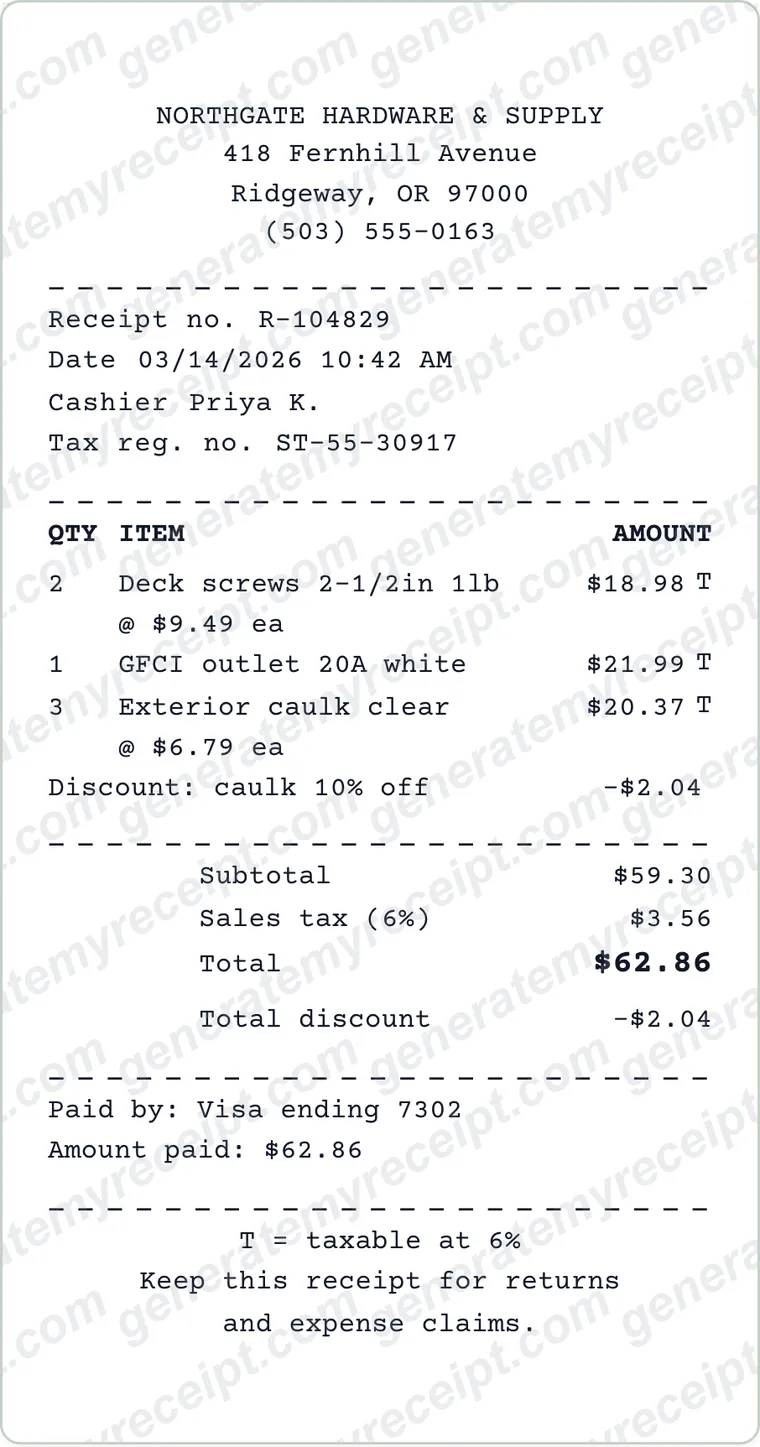
- 2 × Deck screws 2-1/2in 1lb @ 9.49
- 18.98
- 1 × GFCI outlet 20A white @ 21.99
- 21.99
- 3 × Exterior caulk clear @ 6.79
- 20.37
- Discount: caulk 10% off
- -2.04
- Subtotal
- 59.30
- Sales tax 6%
- 3.56
- Total, Visa ending 7302
- 62.86
Sample with invented names: Northgate Hardware & Supply, the editor's starting receipt. Each line shows quantity × unit price and the discount has its own line, which is exactly what a reviewer checks.
Common Mistakes to Avoid
- Vague descriptions such as 'Misc items' or 'Supplies'.
- Hiding a discount inside a unit price, so the line maths no longer adds up.
- Showing one tax figure with no rate when items were taxed at different rates.
- Reusing a receipt number, which makes two receipts look like the same sale.
Good to know: Keep each discount as its own negative line instead of lowering the unit price. A reviewer can then check every line as quantity × unit price, and the Total discount row still shows how much was taken off.
Which Document Do You Need?
| If you have | Use |
|---|---|
| You only need to show that you paid | A regular receipt or card slip with the total is usually enough. Expense, FSA and insurance claims normally need the itemized version. |
| An employer, FSA or insurer asked for an 'itemized receipt' | Use this template: each purchase on its own line with quantity, unit price and total, plus tax and payment details. |
| A bill came back marked 'non-itemized' | Itemized is a level of detail, not a separate document. Sales, restaurant, hotel and medical receipts can all be itemized; ask the business for the version that breaks the total into lines. |
| You're VAT-registered in the UK and the sale is over £250 | You need a full VAT invoice with the customer's name and address; see HMRC's VAT guide. |
Step-by-Step Details
- Add your business details. Enter your business name, address and phone, plus a tax or registration number in Store details if your customer needs one.
- Set the receipt number and date. Give each receipt its own number and the date of the sale.
- Add each item. Give every line a clear description, a quantity and a unit price. The line total is calculated for you.
- Apply discounts and tax. Mark discount lines, set the tax rate under Receipt Style, then check the subtotal, tax and total. The sales tax calculator can work out a rate.
- Download your receipt. Download the itemized receipt as a PDF or PNG. Free downloads carry a watermark; Pro removes it.
Itemized Receipt FAQs
What is an itemized receipt?
A receipt that lists each item or service separately, with its quantity, price and line total, instead of a single amount. Discounts, tax and the payment method appear below the lines.
Why do employers ask for itemized receipts?
To see what was bought and leave out anything their policy doesn't reimburse, such as alcohol or personal items. A total alone doesn't show that.
Is a credit card slip an itemized receipt?
No. A card slip shows the total and payment details, not what was bought, so expense and FSA reviewers usually ask for the itemized receipt instead.
How do I get an itemized receipt from a store?
Ask at the counter, or contact customer service with the date, amount and card used. Many retailers can reprint a receipt from their system.
Can I show different tax rates on one receipt?
The tax line is calculated at one rate on the subtotal and labeled with that rate. If some lines are taxed differently, mark each line with its tax code and type the correct amount into the tax row. Your figure stays, but the total doesn't recalculate from it, so type the total too.
Does an itemized receipt need the seller's tax number?
If you're VAT-registered in the UK, yes: even a simplified VAT invoice must show your VAT registration number. In the US, check your state's sales-tax rules; use the Tax reg. no. line in Store details if you need one.
Is GenerateMyReceipt free to use?
Free to make and download (watermarked); Pro removes the watermark. No signup is needed to download. Pro costs $9.99 a month, or $70.99 a year (about $5.92 a month).
What file formats can I download my receipt in?
Download as a PDF or PNG, then print or share the file.
Related Templates
Browse all receipt templates
Ready to create your itemized receipt?
Free downloads include a watermark. No account required.
Use Honestly: use these receipts for payments you actually received. Don't use them to claim expenses, returns or tax deductions for purchases that didn't happen.