Electronics
Free Apple Store Receipt Template
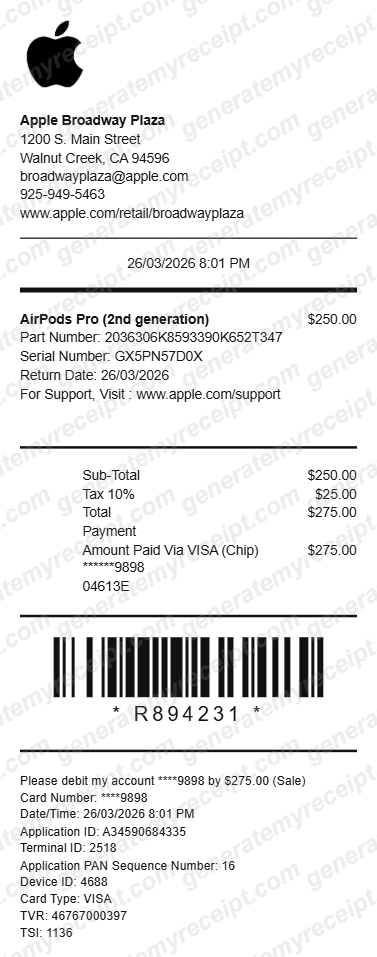
Recreate an Apple Store-style thermal receipt with a live editor — store details, product with part and serial number, tax, card payment summary, and a barcode, formatted like the slip printed at an Apple Store register.
- No signup required
- Works on any device
- Private & secure
- Add your logo
- Edit every item
- Save business info
- Barcode included
- Multiple receipt styles
- PDF, print, or email
What's on a Apple Store Receipt
Worth knowing before you fill one in.
Part & serial number
Apple prints both a part number and a device serial number on the slip — the pair AppleCare and warranty claims look up.
Return window
A return-by date on the receipt itself, since Apple's standard return window is time-limited.
Card entry method
How the card was processed — chip, tap, or swipe — alongside the last four digits, matching a real terminal printout.
Barcode
A scannable barcode tied to the transaction, used for returns and in-store lookups.
Making Your Apple Store Receipt, Step by Step
Pick, fill in, export. That's the whole flow.
- 1
Start with the Apple Store Receipt layout
Already matched to what this kind of transaction needs — no blank page to stare at.
- 2
Fill in your details
Add the amounts, dates, and names for this apple store receipt. Totals calculate automatically as you type.
- 3
Export and send
Download as a PDF, print it, or email it straight to the other party.
Good to Know
If the device is still in your Apple ID purchase history or Wallet, that's the authoritative record for a real warranty claim. Use this builder to recreate a lost slip for your own filing, not to bypass a support verification.
Common Uses for a Apple Store Receipt
A few of the ways people put this template to work.
AppleCare or warranty claims
A serial number on record is usually the first thing an AppleCare or warranty claim asks for.
Trade-in or resale proof
Buyers of a used Apple device often want to see proof of original purchase alongside the device itself.
Expense or gift documentation
A clean copy for a business expense report or to note a device given as a gift.
Apple Store Receipt FAQs
What information does a real Apple Store receipt include?
Store location, date and time, the product with part and serial number, tax, payment method with card entry type, and often a barcode and return-by date.
Can I generate a receipt for any Apple product, not just AirPods?
Yes — edit the item line, part number, and price to match any Apple Store purchase: iPhone, iPad, Mac, or accessories.
Is GenerateMyReceipt free to use?
Yes. You can create and download basic receipts for free, with no signup required. Paid plans add saved branding, templates, and receipt history.
What file formats can I download my receipt in?
Download as a PDF, print it directly, or email it to your customer instantly.
Related Templates
Apple Store Receipt (Boxed Layout)
Build a boxed, letterhead-style Apple Store receipt with a section-based live editor — logo and store header, dated purchase line, itemized product, card details, and a barcode footer, laid out like a printed store copy rather than a thermal roll.
Amazon Receipt
Recreate an Amazon-style order invoice with a live editor — seller details, billing and shipping addresses, itemized products with tax rates, and a running total, formatted like the invoice Amazon emails after checkout.
Adidas Receipt
Recreate an Adidas retail-style receipt with a live, click-to-edit builder — store details, item lines, tax breakdown, and a scannable barcode, formatted the way an in-store register slip actually prints.